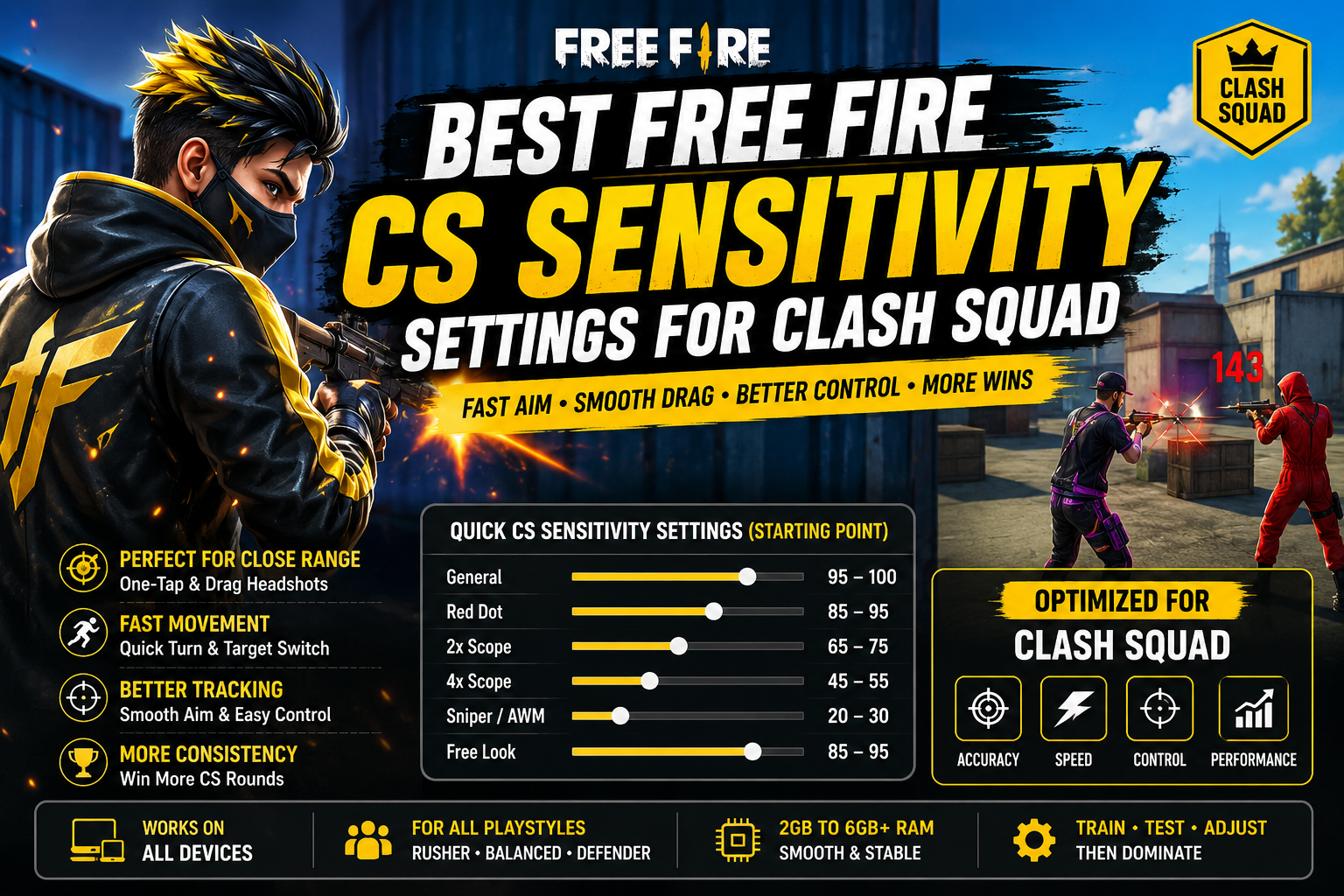
Clash Squad compresses everything into tight, fast, close-quarters rounds — there's no looting phase to ease into, no long rotation to settle your nerves. From the moment a round starts, you're expected to react instantly and land shots consistently. That's exactly why Free Fire CS sensitivity can't just be copied from a BR or general setup — CS rewards fast, controlled aim more than any other mode, and the settings that work in open-field BR fights often feel sluggish or overshoot constantly in a tight CS gunfight.
n
Quick CS Sensitivity Settings
n
Treat this as a starting point, not a fixed formula — test it in Training and actual CS matches before trusting it in ranked play.
n
| Setting Starting Value | |
|---|---|
| General | 95–100 |
| Red Dot | 85–95 |
| 2x Scope | 65–75 |
| 4x Scope | 45–55 |
| Sniper/AWM | 20–30 |
| Free Look | 85–95 |
n
Notice General and Red Dot sit higher here than in a BR-focused setup — CS's close-range, fast-paced nature rewards quicker responsiveness, since most fights are decided in a second or two.
n
Free Fire Sensitivity Settings
n
Why Clash Squad Sensitivity Is Different
n
CS isn't just "BR without looting" — the pace and structure of the mode change what sensitivity needs to do:
n
- Shorter fights mean there's less time to correct a bad first reaction, so your sensitivity needs to be immediately usable rather than something you ease into over a match.
- Faster enemy movement is common since players are constantly peeking, strafing, and repositioning within a small map.
- Close-range engagements dominate CS far more than BR, which is why General and Red Dot sensitivity matter more here than scope settings.
- Quick target switching — fighting one enemy and immediately needing to turn toward a second — rewards a sensitivity that's fast but still controllable.
- Fast camera movement is a constant requirement, especially on smaller CS maps where enemies can appear from multiple directions in quick succession.
- Consistency matters more than in BR, since CS is round-based — a sensitivity that only works some of the time will cost you rounds repeatedly rather than just one bad BR engagement.
n
Best General Sensitivity for CS
n
General sensitivity is the backbone of CS aim, since so much of the mode happens in hip-fire or lightly-aimed close-range exchanges.
n
A starting range of 95–100 suits CS's fast pace for most players. From there:
n
- Close-range movement — turning quickly to face a flanking enemy — is where General sensitivity shows up most in CS.
- Camera turning needs to feel immediate; any noticeable delay costs you the fight in a mode this fast.
- Shotgun fights particularly reward high General sensitivity, since these exchanges are often decided by who turns and fires first.
- SMG fights benefit similarly, though slightly more control matters here than in pure shotgun duels.
- Target switching between two enemies in the same round tests General sensitivity directly — if you're consistently late to the second target, that's a sign to raise it.
n
If it feels too fast: you'll notice your crosshair swinging past enemies during quick turns — lower it in small steps. If it feels too slow: you'll feel like you're always a beat behind reacting to movement — raise it gradually.
n
Best Red Dot Sensitivity for CS
n
Red Dot sensitivity governs the actual aiming precision in most CS gunfights, since Red Dot sights are the most commonly used sight in this mode.
n
A starting range of 85–95 — noticeably higher than a BR-focused Red Dot setting — reflects how much CS rewards fast target tracking at close range.
n
- SMG fights need Red Dot sensitivity that can keep pace with an enemy strafing at close range without lagging behind.
- AR fights at CS's typical engagement distances (closer than BR) benefit from a similarly responsive setting.
- Drag shots are used constantly in CS due to sustained close-range gunfights, so Red Dot sensitivity needs to support smooth, repeatable drag motion.
- Small aim corrections — fine-tuning onto a strafing enemy's head — are where an overly high Red Dot sensitivity causes visible overshooting, so if you're consistently missing just above or beside enemies, dial it back slightly.
n
Best 2x Scope Sensitivity for CS
n
2x scope sees less use in CS than in BR, since most CS maps and fights happen at ranges where Red Dot is sufficient — but it's still relevant on certain maps with longer sightlines.
n
A starting range of 65–75 works well when you need it. Useful when:
n
- Holding an angle across a longer CS map lane where Red Dot precision starts to feel less reliable.
- Tracking an enemy peeking repeatedly from a fixed position at moderate distance.
n
Avoiding excessive movement: since 2x fights in CS are often brief, resist the urge to make large sweeping corrections — small, controlled adjustments land more consistently than fast, wide ones.
n
Best 4x Scope Sensitivity for CS
n
CS emphasizes close engagements far more than long-range ones, so 4x plays a smaller role here than in BR — but it's still worth having dialed in for the CS maps and situations where it applies.
n
A starting range of 45–55 gives you control without over-investing settings time into a scope you'll use less often than Red Dot.
n
- Medium-range use on more open CS maps is the main scenario where 4x comes into play.
- Controlled aiming matters more than speed at this zoom, similar to BR — small, deliberate corrections outperform fast snaps.
- Since 4x isn't central to most CS rounds, treat this setting as "good enough and consistent" rather than a major focus of your practice time.
n
CS Sensitivity for One-Tap & Drag Shots
n
CS is arguably the best mode to practice one-taps and drag shots in, simply because of how many close-range gunfights you get per session. That said, sensitivity is only part of the equation:
n
- Crosshair placement — keeping your crosshair near head height as you peek and move — matters more than any specific sensitivity number.
- Short, controlled drag — a small, practiced upward flick to counter recoil — is what actually lands consistent headshots in CS's fast exchanges, not raw sensitivity speed.
- Timing — firing the instant your crosshair crosses the target rather than trying to perfectly settle on it — decides most close-range CS duels.
- Fire-button movement — your thumb's drag motion while holding the fire button needs to stay smooth and repeatable, which depends as much on button placement as on sensitivity.
- Sensitivity alone does not create one-taps — it supports consistent small corrections, but the actual skill comes from repeated practice at a sensitivity you know well.
n
Free Fire Headshot Sensitivity
n
Best CS Sensitivity for Different Playstyles
n
There's no single perfect number — your ideal CS sensitivity depends on how you actually play rounds:
n
- Aggressive rusher — pushes fights immediately, so leaning toward the higher end of the General/Red Dot baseline supports the fast reactions this style demands.
- Balanced player — mixes pushing and holding depending on the round, so the baseline table above is a reasonable fit without much adjustment.
- Defensive player — holds angles and waits for enemies to peek, so slightly lower Red Dot sensitivity can help with precision on the first shot, since reaction speed matters a bit less here.
- Shotgun-focused player — benefits from higher General sensitivity specifically, since shotgun duels are decided by who turns and fires fastest.
- SMG-focused player — benefits from a Red Dot sensitivity that supports sustained tracking during close-range sprays, slightly favoring control over raw speed compared to a shotgun setup.
n
These are adjustment directions, not fixed values — use them to decide which way to nudge the baseline rather than as final numbers.
n
CS Sensitivity for Different Weapons
n
Sensitivity doesn't need a completely separate profile per weapon, but how your existing settings feel does shift by weapon type:
n
- Shotguns reward high General sensitivity and fast reactions, with precision mattering less due to shotgun spread.
- SMGs reward high Red Dot sensitivity paired with smooth drag control for sustained close-range sprays.
- ARs sit in the middle — your baseline settings should work reasonably well without major changes for most AR-focused CS play.
- Pistols (common in early CS rounds with limited money) behave similarly to SMGs in terms of sensitivity needs — fast, controlled Red Dot tracking.
- Snipers are used less often in CS than BR, but when they come up, your baseline Sniper sensitivity from the quick-settings table should still apply.
n
CS Sensitivity for Low-End Phones
n
As always, it's worth being clear: RAM alone doesn't determine what sensitivity will work for you — CS's fast pace actually makes performance consistency even more important than in BR, since a single missed frame during a close-range duel can cost the round.
n
2GB RAM: FPS instability here is especially costly in CS's fast exchanges. Confirm stable frame rate in Training before assuming your sensitivity settings are the problem.
n
3GB RAM: More headroom, but background apps can still cause dips during intense rounds — closing them before playing helps keep CS's fast pace feeling consistent.
n
4GB RAM: Generally stable enough for reliable CS performance, making sensitivity tuning worthwhile and predictable.
n
6GB+ RAM: RAM is unlikely to be limiting you here. If CS aim still feels inconsistent, look elsewhere first.
n
Beyond RAM specifically:
n
- FPS stability matters more in CS than almost any other mode, given how quickly rounds are decided.
- Touch response issues (worn screen protector, screen damage) directly hurt drag-shot consistency.
- Heat during back-to-back CS rounds without breaks can trigger throttling that affects performance mid-match.
- Background apps compete for resources exactly when you need consistent frame timing most.
- Graphics settings pushed beyond your device's comfortable range can cause the stutters that make sensitivity feel unreliable.
n
DPI and CS Sensitivity
n
DPI affects how your device interprets touch input at a system level, separate from Free Fire's own sensitivity sliders.
n
- What DPI changes: it alters how far on-screen movement occurs for a given physical finger movement, which can shift how your current CS sensitivity feels without adjusting any in-game value.
- How it affects touch feel: since CS rewards fast, precise corrections, a DPI change can make your existing settings feel noticeably different — sometimes better, sometimes worse.
- Higher DPI is not automatically better — pushing it too high can make the fine corrections CS demands harder to execute consistently.
- Test DPI and sensitivity separately. Change one, play several CS matches, and evaluate before touching the other — this is especially important in CS, where fights are fast enough that small inconsistencies are easy to misattribute.
n
HUD & Fire Button for Clash Squad
n
CS's close-range focus makes HUD layout especially important, since every fight demands quick, precise inputs.
n
- Fire-button size — a slightly larger button gives more room for the smooth, repeated drags CS's sustained close-range fights demand.
- Button placement should sit exactly where your thumb naturally rests, since CS gives you no time to reposition mid-fight.
- Drag space around the fire button matters more in CS than BR, given how frequently you're dragging during extended close-range exchanges.
- Scope button placement matters less here than in BR, since CS relies less on scoped fights, but should still be reachable without disrupting your aiming hand.
- Movement controls need clear separation from your fire/aim area, since CS's fast peeking and repositioning make accidental inputs costly.
- Finger travel should be minimized across your whole HUD — every fraction of a second matters in CS's short rounds.
n
How to Test CS Sensitivity
n
A structured process works better than guessing between rounds:
n
- Start with the baseline from the table above.
- Enter Training mode before testing in real CS matches.
- Test close-range movement — practice fast turns and target acquisition.
- Test shotgun/SMG fights specifically, since these dominate CS engagement.
- Test Red Dot sensitivity with a focus on sustained tracking and drag control.
- Test medium-range aim using 2x, even though it's used less often in CS.
- Change only ONE setting at a time, so you know exactly what caused any change.
- Play several CS matches, ideally across different opponents and maps.
- Fine-tune gradually — CS's fast pace makes it tempting to overreact to a single bad round, but consistency across matches is the real test.
n
CS Sensitivity Troubleshooting
n
| Problem What to Try | |
|---|---|
| Aim feels too fast | Lower General/Red Dot sensitivity in small steps |
| Aim feels too slow | Raise General sensitivity gradually |
| Drag goes above the target | Lower Red Dot sensitivity slightly and practice a shorter, more controlled drag |
| Drag stops below the target | Raise Red Dot sensitivity slightly, or extend your drag motion during practice |
| Shotgun aim feels inconsistent | Focus on General sensitivity and practice fast, repeatable turns in Training |
| SMG tracking feels difficult | Lower Red Dot sensitivity slightly for steadier sustained tracking |
| Scope movement feels shaky | Lower the relevant scope's sensitivity (2x/4x) and prioritize small, deliberate corrections |
| Sensitivity feels different after switching devices | Expect this — retest from the baseline rather than assuming old settings transfer directly |
n
Common CS Sensitivity Mistakes
n
- Copying another player's settings blindly, without accounting for differences in device, screen size, and reaction speed.
- Constantly changing sensitivity after a few lost rounds, which prevents your muscle memory from stabilizing in a mode that already demands fast, instinctive reactions.
- Using extreme values because they seemed impressive in a clip, rather than because they held up in your own testing.
- Changing DPI and sensitivity together, making it impossible to isolate which change actually affected your aim.
- Ignoring FPS issues while blaming sensitivity — CS's fast pace makes performance instability especially costly.
- Ignoring touch response problems, like a damaged screen protector, that quietly hurt drag consistency round after round.
- Assuming sensitivity guarantees headshots — crosshair placement, timing, and repetition matter just as much in CS's tight gunfights.
n
FAQ
n
What is the best Free Fire CS sensitivity?
n
There's no universal number, but a General sensitivity around 95–100 with Red Dot around 85–95 is a reasonable starting point, reflecting CS's fast, close-range pace. Fine-tune from there based on whether you're overshooting or reacting too slowly.
n
What sensitivity is best for Clash Squad?
n
Slightly higher General and Red Dot sensitivity than a BR-focused setup tends to suit CS, since fights are shorter and closer. Use the baseline table as a starting point and adjust based on your own testing.
n
Is CS sensitivity different from BR sensitivity?
n
Yes, in emphasis. CS rewards faster General and Red Dot sensitivity due to its close-range, fast-paced nature, while BR requires more attention to scope sensitivity for varied engagement distances.
n
n
What is the best sensitivity for shotgun fights?
n
Higher General sensitivity tends to help, since shotgun duels are often decided by who turns and fires first rather than by fine aim precision.
n
Is higher sensitivity better for CS?
n
Not automatically. Higher sensitivity supports CS's fast pace, but too high causes overshooting even in a mode built around speed. The right sensitivity is the one you can control consistently under pressure.
n
Does DPI improve CS aim?
n
DPI changes how your sensitivity feels, but it doesn't directly improve accuracy. It should be tested separately from your in-game sensitivity to understand its actual effect on your CS performance.
n
How long should I test new CS sensitivity?
n
Test across several full matches, ideally against different opponents, before judging a change. CS's short rounds mean a single match isn't a reliable sample size.
n
Final Verdict
n
Clash Squad's fast, close-range structure means your free fire CS sensitivity should lean more responsive than a BR-focused setup, particularly for General and Red Dot. Use the baseline table as a starting point, test it specifically in close-range scenarios and actual CS matches, and change only one setting at a time as you fine-tune. Your device's FPS stability matters even more here than in slower-paced modes, since CS rounds are won and lost in seconds. Ultimately, prioritize consistency you can rely on round after round over chasing an extreme sensitivity number that only feels good occasionally — and remember that crosshair placement, timing, and practice do as much heavy lifting as any setting.