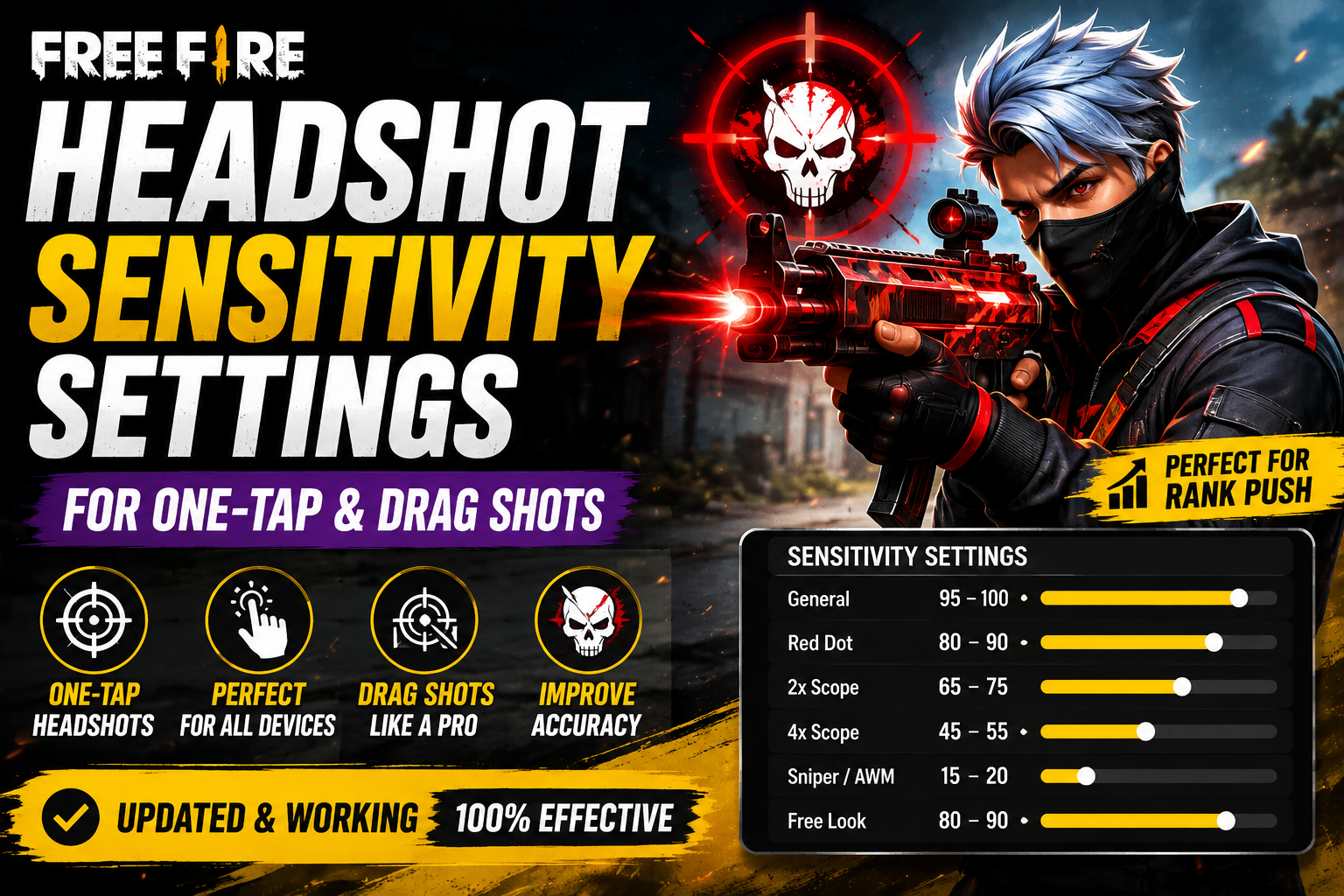
A sensitivity setup built for close-range headshot fights doesn't automatically hold up across a full Battle Royale match. BR throws you into everything from point-blank shotgun fights to 200-meter sniper duels within the same game, which means your Free Fire BR sensitivity needs to handle a much wider range of situations than a setup built for one specific type of engagement. This guide focuses specifically on tuning sensitivity for the full spread of BR combat — not just headshots — covering close, mid, and long-range control so your settings hold up no matter how the match unfolds.
n
Quick BR Sensitivity Settings
n
Use this as a baseline starting point, not a final answer. Every player's ideal numbers shift slightly based on device and playstyle.
n
| Setting Starting Value | |
|---|---|
| General | 85–100 |
| Red Dot | 75–85 |
| 2x Scope | 60–70 |
| 4x Scope | 40–50 |
| Sniper/AWM | 15–25 |
| Free Look | 75–85 |
n
Notice how the values step down progressively as zoom level increases — this is intentional, since higher magnification amplifies even small finger movements. Test each range in Training mode before relying on it in a ranked match.
n
Free Fire Sensitivity Settings
n
Why BR Sensitivity Needs Different Control
n
Battle Royale isn't one type of fight repeated over and over — it's several different combat scenarios stitched into a single match:
n
- Close-range fights (looting fights, building clears) demand fast camera snaps and quick target acquisition.
- Mid-range fights (open-field AR duels) reward a balance between speed and precision.
- Long-range fights (sniping across the map, holding a ridge) need slow, controlled, minimal camera movement.
- Enemy tracking — following a moving target smoothly — gets harder as distance increases, since the same physical finger movement covers more in-game distance at range.
- Camera movement overall needs to feel natural switching between these scenarios without you manually changing settings mid-fight, which is why your General and Red Dot sensitivity form the foundation everything else builds on.
- Scope control becomes progressively more sensitive to small hand movements as you zoom in, which is why scope-specific sensitivity values matter so much in BR specifically.
n
Best General Sensitivity for BR
n
General sensitivity is your foundation — it governs how your camera moves during regular (non-scoped) gameplay, including hip-fire and quick 180-degree turns.
n
A starting range of 85–100 covers most players reasonably well for BR's mixed engagement distances. From there:
n
- If aim feels too slow — you're consistently late reacting to enemies appearing on screen or rotating toward flanks — raise General gradually, testing a few points at a time.
- If aim feels too fast — your crosshair regularly overshoots targets during close-range fights, especially shotgun/SMG engagements — lower it in small increments until turning feels controllable again.
n
Because BR fights happen at unpredictable distances, General sensitivity is worth testing specifically in situations where you need to snap toward a sudden close-range threat, since that's where a poorly tuned General setting shows up most obviously.
n
Best Red Dot Sensitivity for BR
n
Red Dot sensitivity covers your unscoped-to-lightly-scoped aiming, which handles a large share of actual BR gunfights — most AR and SMG engagements happen at this zoom level.
n
A starting range of 75–85 works for most players. Consider:
n
- AR fights at mid-range benefit from a Red Dot sensitivity that lets you track strafing movement without overcorrecting.
- SMG fights at close range often feel better with Red Dot sensitivity closer to your General setting, since speed matters more here.
- Close-range tracking — following an enemy circling you in a house clear — is where excessive Red Dot sensitivity causes the most visible problems, since your crosshair keeps swinging past the target.
- Medium-range aim rewards a steadier hand, so if you're mixing close and mid-range fights often, err slightly lower rather than higher.
- Recoil control during sustained fire depends on Red Dot sensitivity feeling predictable — if your shots consistently climb above the target during a spray, that's a sign to lower it slightly.
n
Best 2x Scope Sensitivity
n
The 2x scope sits in an important middle zone for BR — commonly used for mid-range AR fights across open areas.
n
A starting range of 60–70 balances tracking ability with control. Practical use cases:
n
- Medium-range fights across open fields, where enemies are visible but not close enough for Red Dot precision, are the main use case for 2x.
- AR weapons paired with 2x scope are a common BR combination, so it's worth spending extra Training time here specifically.
- Tracking moving enemies at this range requires smooth, continuous correction rather than sharp snaps — if your 2x sensitivity is too high, you'll find yourself over-adjusting constantly instead of settling into a steady track.
n
Adjustment symptoms: if enemies at mid-range consistently end up beside or above your crosshair rather than centered, lower your 2x sensitivity in small steps and re-test.
n
Best 4x Scope Sensitivity
n
The 4x scope demands noticeably more restraint than 2x, since camera movement is magnified further.
n
A starting range of 40–50 is a reasonable place to begin. Focus areas:
n
- Long-range BR fights — engaging enemies across larger open areas — are where 4x becomes essential, and where sensitivity errors become most punishing.
- Controlled aiming matters more than speed at this zoom level; a slower, more deliberate correction style tends to outperform fast, reactive movement.
- Recoil control with 4x requires smaller, more careful drag movements compared to Red Dot or 2x, since the same physical drag covers more visual distance.
- Avoiding excessive camera movement is the core skill here — resist the instinct to snap your view quickly, since at 4x this almost always causes overshooting.
n
Sniper / AWM Sensitivity
n
Sniper sensitivity should be the lowest value in your entire configuration, and for good reason.
n
A starting range of 15–25 reflects just how much finger movement gets magnified at this zoom level. Key points:
n
- Precision matters more than anything else here — a sniper shot is typically a single, deliberate commitment rather than a rapid correction.
- Small adjustments are all you should need at this sensitivity; if you find yourself making large sweeping movements to track a target, your sensitivity is likely still too high.
- Scope movement at high zoom means even a slightly elevated sensitivity can make your crosshair swing wildly past a stationary target.
- Excessive sensitivity at sniper range is one of the most common reasons players miss long-range shots that looked "easy" — the target was visible and still, but the crosshair overcorrected past it.
n
If you consistently miss sniper shots by overshooting rather than undershooting, that's a clear signal to lower this value specifically, separate from your other scope settings.
n
Best Sensitivity for Different BR Ranges
n
| Range Main Challenge Sensitivity Adjustment | ||
|---|---|---|
| Close (0–15m) | Fast target acquisition, overshooting risk | Keep General/Red Dot responsive but controllable; prioritize consistency over raw speed |
| Mid (15–50m) | Tracking strafing enemies, AR/2x control | Moderate Red Dot/2x sensitivity; smooth tracking over sharp snaps |
| Long (50m+) | Precision, minimal overcorrection | Lower 4x/Sniper sensitivity; deliberate, small movements |
n
BR Sensitivity for Different Playstyles
n
There's no single perfect value — your ideal setup shifts based on how you actually play:
n
- Aggressive rusher — spends most fights at close range, so a slightly higher General and Red Dot sensitivity (toward the top of the baseline ranges) often supports the fast reactions this playstyle demands.
- Balanced player — engages across all ranges depending on the situation, so the baseline table above is usually a good fit without much deviation.
- Long-range player — prioritizes holding angles and engaging from distance, so lower 2x/4x sensitivity than the baseline, with extra Training time spent on scope control, tends to pay off more.
- Sniper-focused player — should treat their sniper sensitivity as the most important value to fine-tune precisely, even more than General, since that's where most of their fights are decided.
n
None of these are rigid categories — most players blend elements of several, and your settings should reflect how you actually play rather than a label.
n
BR Sensitivity for Low-End Phones
n
As with sensitivity generally, it's worth repeating: RAM is only one factor, not the deciding one, in how your sensitivity feels.
n
2GB RAM: FPS instability is common at this tier, and inconsistent frame rate makes any sensitivity setting feel unreliable, since your input and the game's rendering fall out of sync during demanding moments. Confirm stable performance in Training before assuming a sensitivity issue.
n
3GB RAM: Somewhat more stable, but background apps can still cause noticeable dips during intense BR moments (final circles, multiple enemies) — closing them before matches helps sensitivity feel more consistent.
n
4GB RAM: Generally reasonable for stable performance, making sensitivity tuning more predictable and worth investing time into.
n
6GB+ RAM: RAM is unlikely to be your limiting factor. If BR sensitivity still feels inconsistent, look at other performance factors instead.
n
Beyond RAM specifically, keep these in mind:
n
- FPS drops during intense fights can make even well-tuned sensitivity feel erratic — this is a performance issue, not a settings issue.
- Touch response can degrade with a worn screen protector or a cracked screen, affecting how accurately your drags register.
- Background apps running during a match compete for the same resources your game needs for smooth rendering.
- Graphics settings pushed too high for your device can cause the exact stutters that make sensitivity feel inconsistent.
- Device heat during long sessions can trigger throttling, which compounds all of the above.
n
n
DPI and BR Sensitivity
n
DPI affects how your device interprets touch movement at a system level, independent of Free Fire's own sensitivity sliders.
n
- What DPI changes: it alters how much on-screen movement results from a given physical finger movement, which shifts how your existing sensitivity settings feel without changing the numbers themselves.
- How it affects touch feel: a DPI change can make an already-tuned sensitivity setup feel completely different, sometimes better and sometimes worse.
- Higher DPI is not automatically better — it doesn't inherently improve tracking or precision, and pushing it too far can make fine scope adjustments harder to control.
- Test DPI separately from your in-game sensitivity. Change one, play several BR matches, and evaluate before touching the other.
n
HUD and Fire Button for BR
n
BR specifically rewards a HUD that supports fast transitions between movement, aiming, and looting — more so than closed-arena modes like CS.
n
- Fire button placement and size affect how cleanly you can drag while shooting across all the range categories covered above.
- Scope button should be reachable without disrupting your aiming hand, since BR often requires quick scope-in/scope-out decisions as engagement distance changes mid-fight.
- Movement controls need enough separation from your aim area to avoid accidental drags while repositioning during rotations.
- Button placement overall should minimize finger travel between looting, moving, and fighting, since BR's pacing shifts between these constantly.
- Button size — slightly larger fire and scope buttons can help during frantic late-game fights, though this comes down to personal comfort and screen size.
n
How to Test BR Sensitivity
n
A structured approach avoids the trial-and-error frustration of constantly guessing:
n
- Start with the baseline table above.
- Enter Training mode first, before any live match testing.
- Test close range — practice fast target acquisition against bots up close.
- Test mid range — practice tracking movement with your 2x scope.
- Test long range — practice controlled aiming with 4x and sniper scopes.
- Change ONE setting at a time, so you always know what caused a change in feel.
- Play several BR matches, since a single match rarely represents your actual overall consistency.
- Keep notes on which range felt off and what you changed, so you're not relying on memory alone.
- Fine-tune gradually — small adjustments over several sessions beat one large overhaul.
n
BR Sensitivity Troubleshooting
n
| Problem What to Try | |
|---|---|
| Aim feels too fast | Lower General/Red Dot sensitivity in small increments |
| Aim feels too slow | Raise General sensitivity gradually |
| Scope shakes or overshoots | Lower the specific scope's sensitivity (2x/4x/Sniper) |
| Tracking moving enemies feels difficult | Practice smooth, continuous correction rather than sharp snaps; consider a slightly lower Red Dot/2x value |
| Long-range aim is unstable | Lower Sniper/4x sensitivity specifically; test in Training against stationary targets first |
| Close-range tracking feels slow | Raise General/Red Dot slightly, but only in small steps |
| Sensitivity changes after switching devices | Expect this — retest from the baseline rather than assuming old numbers transfer directly |
n
Common BR Sensitivity Mistakes
n
- Copying another player's settings without accounting for differences in device, screen size, and playstyle.
- Constantly changing numbers after a few rough fights, which prevents your muscle memory from ever stabilizing.
- Using extreme sensitivity because it looked impressive in a clip, rather than because it was actually tested against your own gameplay.
- Changing DPI and sensitivity simultaneously, making it impossible to isolate what actually caused a change in feel.
- Ignoring FPS problems while blaming sensitivity — unstable performance undermines even a well-tuned setup.
- Ignoring touch response issues, like a damaged screen protector, that quietly degrade input accuracy.
- Assuming sensitivity alone improves aim — positioning, map awareness, and practice matter just as much in BR, arguably more given how much time is spent outside direct combat.
n
FAQ
n
What is the best Free Fire BR sensitivity?
n
There's no single universal number, but a General sensitivity around 85–100 with progressively lower scope sensitivities (2x, 4x, sniper) is a reasonable starting point most players can build from.
n
Is BR sensitivity different from headshot sensitivity?
n
They overlap significantly, but BR sensitivity needs to handle a wider range of distances — including long-range sniper engagements — that pure headshot-focused setups don't always account for as carefully.
n
Free Fire Headshot Sensitivity
n
What is the best sensitivity for close-range BR fights?
n
A slightly higher General and Red Dot sensitivity, within the baseline ranges given above, tends to support the fast reactions close-range BR fights demand — but keep it controllable enough to avoid overshooting.
n
What sensitivity is good for long-range BR?
n
Lower 4x and Sniper sensitivity than your other settings, since precision matters far more than speed once you're engaging enemies at distance.
n
Does DPI affect BR sensitivity?
n
Yes — DPI changes how your device interprets touch input, which can shift how your existing sensitivity feels even without changing the in-game numbers. It should be tested separately from sensitivity itself.
n
Is higher sensitivity better for BR?
n
Not inherently. Higher sensitivity helps with fast reactions but increases overshooting risk, especially at longer ranges. The right sensitivity is the one you can control consistently across all engagement distances, not simply the fastest one.
n
How long should I test a BR sensitivity setup?
n
Give it several full matches across different situations — close fights, mid-range engagements, and long-range moments — before judging it. A single match, especially an unusually good or bad one, isn't a reliable test.
n
Final Verdict
n
Battle Royale sensitivity has to work across close, mid, and long-range fights within the same match, which is why the baseline settings in this guide step down progressively as zoom level increases. Use them as a starting point, test each range specifically in Training mode, and change only one setting at a time as you fine-tune. Your device's FPS stability and touch response shape how consistent any sensitivity feels in practice, so don't chase numbers without confirming your performance is stable first. Above all, prioritize consistency across different fight distances over any single extreme number — that consistency is what actually translates into more reliable BR performance over time.